
Qt Creator
Syntax Highlighting
Section titled “Syntax Highlighting”For the syntax highlighting, QtCreator supports the same format as Kate, with the xml file ↗ at the same location. Refer to the instruction from the Kate page to enable syntax highlighting.
To install the Slint Language server, check the LSP Documentation.
To setup the lsp:
- Install the
slint-lspbinary - Then in Qt creator, go to Tools > Option and select the Language Client section.
- Click Add
- As a name, use “Slint”
- use
*.slintas a file pattern. (don’t use MIME types) - As executable, select the
slint-lspbinary (no arguments required) - Click Apply or Ok
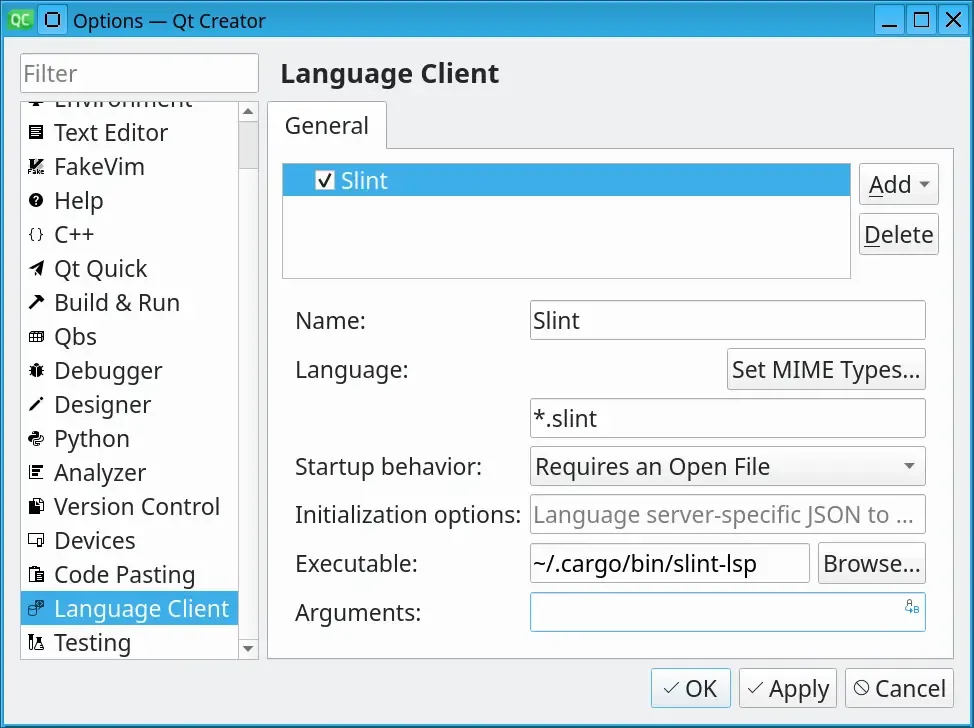
Live Preview
Section titled “Live Preview”Once you have set up the LSP, in order to preview a component, when you have a .slint file open, place your cursor to the name of the component you would like to preview and press Alt + Enter to open the code action menu. Select Show Preview from that menu.
© 2026 SixtyFPS GmbH