
Dialog
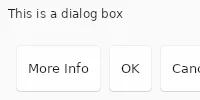
Dialog can be used in place of Window, but it has buttons that are automatically laid out.
A Dialog should have one main element as child, that isn’t a button.
The dialog can have any number of StandardButton widgets or other buttons
with the dialog-button-role property.
The buttons will be placed in an order that depends on the target platform at run-time.
The kind property of the StandardButtons and the dialog-button-role properties need to be set to a constant value, it can’t be an arbitrary variable expression.
There can’t be several StandardButtons of the same kind.
A callback <kind>_clicked is automatically added for each StandardButton which doesn’t have an explicit
callback handler, so it can be handled from the native code: For example if there is a button of kind cancel,
a cancel_clicked callback will be added.
Each of these automatically-generated callbacks is an alias for the clicked callback of the associated StandardButton.
Properties
Section titled “Properties”Same as Window.
Functions
Section titled “Functions”Same as Window.
© 2026 SixtyFPS GmbH